

Integrations & API
Fits the stack you already run
PhishSpot plugs into Microsoft 365, syncs your directory, and exposes everything through webhooks, a REST API and an MCP server — so your program runs where your team already works.
Sync your directory, keep it that way
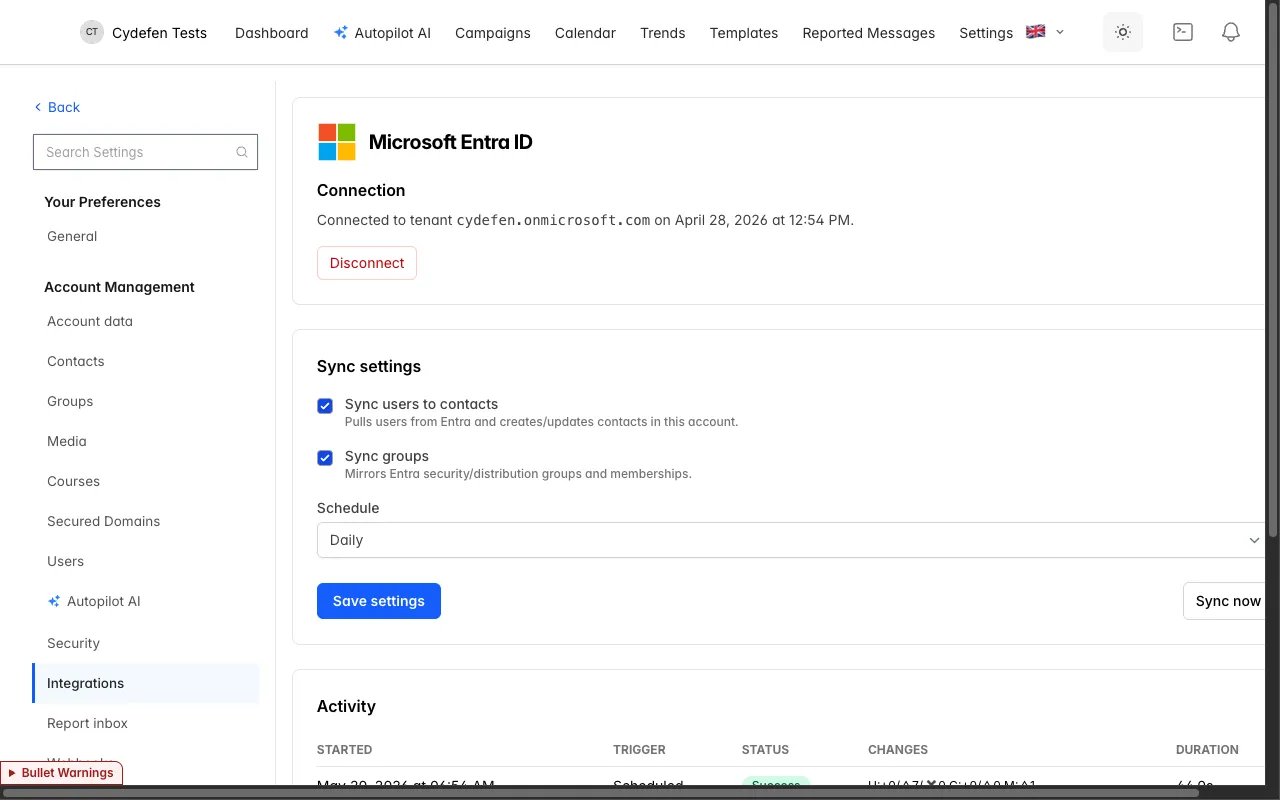
Connect Microsoft Entra ID once and PhishSpot mirrors your people automatically. Users become contacts, groups become groups, and joiners and leavers are handled on a schedule you set.
- Users sync to contacts and Entra groups sync to groups, ready to target.
- Run the sync on a schedule so your audience is never stale.
- Leavers are disabled, not deleted — you keep their history and results.
- Map exactly the groups you want in scope; leave the rest untouched.
One platform, wired into your tools
Identity, events, automation and AI — PhishSpot meets your stack where it is.
Microsoft Entra sync
Directory sync for users and groups, on a schedule. Leavers are disabled, not deleted.
Microsoft 365 SSO
Sign in with Microsoft 365. No extra passwords for your admins to manage.
Signed webhooks
Every event, delivered to your endpoint — signed with HMAC-SHA256 and retried up to five times.
REST API
A full REST API at /api/v1 with token authentication for campaigns, contacts, results and more.
MCP server
Around 60 tools for AI agents, build-only by design — a human always presses launch in the UI.
Outlook report button
The Report Phishing add-in feeds employee reports straight into your account.
Media library
Host images and assets once and reuse them across templates and landing pages.
Roles & access
Three roles — Admin, Editor and Member — with per-account isolation across tenants.
Every event, pushed in seconds
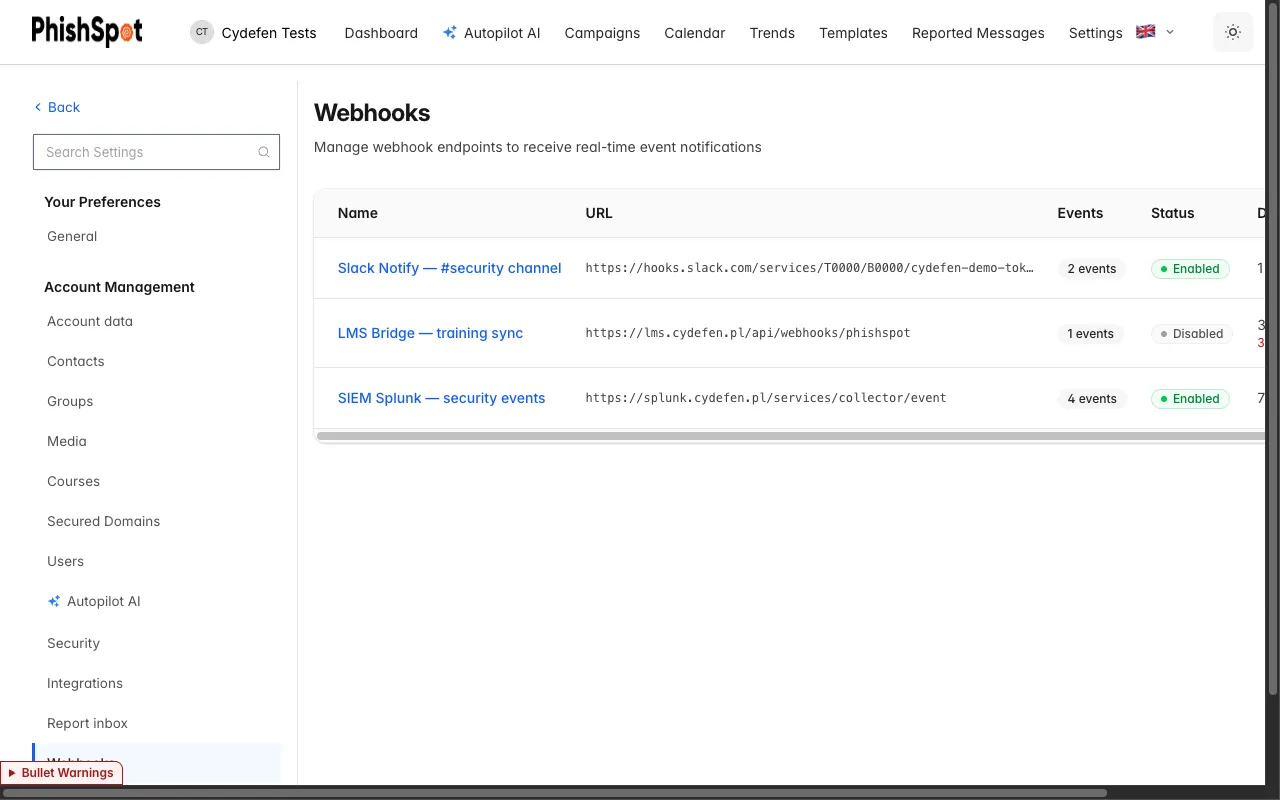
Stream the full campaign funnel to your SIEM, SOAR or data warehouse as it happens. No polling, no gaps — just signed, verifiable events.
- Subscribe to the events you care about across the Sent → Delivered → Opened → Clicked → Submitted → Trained funnel (and Replied).
- Each delivery is signed with HMAC-SHA256 so you can verify it came from us.
- Failed deliveries retry up to five times with backoff.
- Inspect endpoints, recent deliveries and status from the dashboard.
Drive PhishSpot from Claude
Around 60 MCP tools let an AI assistant build a whole program with you — while a human stays firmly in control of anything that sends.
What an agent can’t do
- Build tools never send — no email goes out automatically
- A human presses launch; agents can’t send on their own
- Agents can’t exceed their token’s scope or assigned role
- Agents can’t reach another account’s data
- The few send-scheduling tools are clearly flagged
What an agent can do
- Build campaigns from a spec or a template
- Draft groups, import contacts and organize audiences
- Read results, trends and per-recipient timelines
- Check sending-domain health and provisioning
- Prepare autopilots and webhooks up to the review step
Integrations, explained
Which identity providers do you support?
PhishSpot integrates with Microsoft. You can sign in with Microsoft 365 SSO and sync your directory from Microsoft Entra ID — users become contacts and Entra groups become groups, on a schedule.
What can I automate through the API?
The REST API at /api/v1 covers the platform — campaigns, contacts, groups, results and more — authenticated with a token. Webhooks push events to you in real time, signed with HMAC-SHA256 and retried up to five times.
Is the MCP server safe to give an AI assistant?
Yes, by design. The roughly 60 MCP tools are build-only: an agent can assemble campaigns, contacts and groups up to the review step, but it cannot send. A human always presses launch in the UI, tokens are scoped, and the few tools that schedule real sends are clearly labeled and limited to Admin or Editor roles.
Do you support single sign-on and roles?
Microsoft 365 SSO is supported, and access is governed by three roles — Admin, Editor and Member — with strict per-account isolation so tenants never see each other’s data.
Wire PhishSpot into your stack
SSO, directory sync, webhooks, a REST API and an MCP server — everything you need to run your program where your team already works.